MCP authentication is how an MCP server confirms who is calling before it runs a tool. For remote servers, the MCP authorization specification builds it on OAuth 2.1: the server acts as a resource server, the client gets an access token through a browser consent flow with PKCE, and every token must be issued for that specific server. That covers the case most guides describe, a person connecting Claude or ChatGPT to a product they use. For a software company, it covers one of the callers its MCP server will actually get.
A B2B product's MCP server is called by customers' own assistants, by assistants a customer's IT team manages, by scripts holding an API key, and by the vendor's own agent, which works for users who are already signed in to the product and sometimes for users who are not there at all. The hard part of MCP authentication for a software company is not the token flow. It is making sure every one of those calls resolves to one user in your system, so your server applies that user's permissions and nothing broader.
We learned this by building it. Aimdoc connects to a software company's MCP server and does work as each of its customers, and the first time a customer asked us how to authenticate their server for that, the obvious answer turned out to be the wrong one. This post covers what we chose instead, and what we would tell a team building its first MCP server.
What the MCP authentication guides cover
The guides that rank for "MCP authentication" are good on the protocol. WorkOS's introduction walks through API keys for server-level access and OAuth for user-level access, PKCE, metadata discovery and dynamic client registration, and points out that authorization is optional in the spec. Stytch's guide adds the piece most diagrams skip: the authorization server that issues tokens, shows the consent screen and handles revocation, and the choice between running it yourself or delegating to an outside provider.
Every flow they describe starts with a person in a browser clicking approve. That leaves out three questions a software company runs into quickly:
- What should the server do when the caller is your own agent, and the user signed in to your app ten minutes ago?
- What happens when the work runs while nobody is signed in?
- Once the token says who the user is, how much of that user's access should the agent get?
Five callers, one question
Here is who calls a software company's MCP server, and what the server should see in each case.
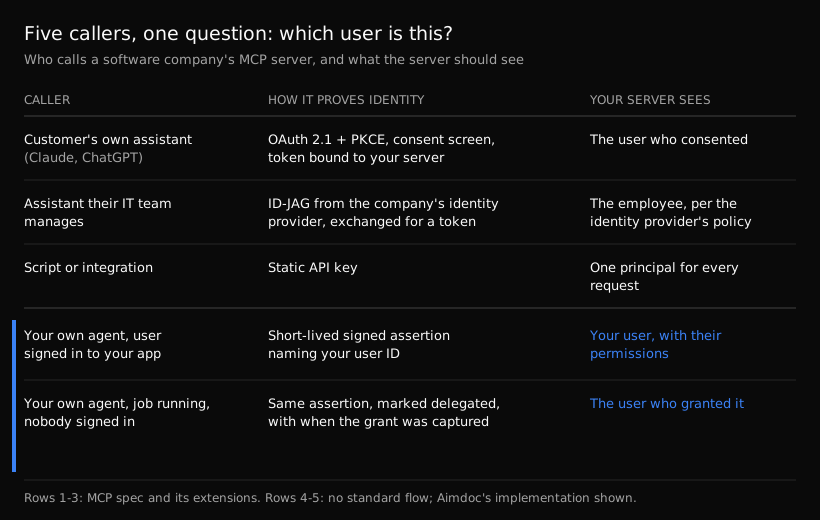
Sources: the MCP authorization specification, the Enterprise-Managed Authorization extension, and Aimdoc's MCP connection docs for rows 4 and 5.
The protocol has an answer for the first three rows. The core spec handles a person connecting their own assistant: tokens are bound to your server with RFC 8707 resource indicators, and your server must not pass the client's token through to another API. For employees whose assistants are managed by their company, Enterprise-Managed Authorization, now listed as a stable extension in the MCP ext-auth repository, replaces the per-server consent screen. The client gets an Identity Assertion JWT Authorization Grant (ID-JAG) from the company's identity provider at sign-on and exchanges it for an access token, so admins set access by group and role in one place. The MCP blog's announcement in June 2026 named Claude, Claude Code and Cowork as clients, Okta as the first identity provider, and Asana, Atlassian, Canva, Figma, Granola, Linear and Supabase among the servers.
API keys are the simple third row, and the one to watch. A key is a principal, not a person: every request with it acts as the same caller, whoever is behind it.
The last two rows are where a software company's own work happens. The spec does not describe them, because they are not about third-party clients at all.
What we got wrong first
On a call in August, a logistics software customer building their MCP server asked how to authenticate it so our agent could use it, and suggested doing it the same way as their CRM connection. That sounds right, and it is not. A CRM integration is connected once by one admin, through OAuth on that admin's account, and then syncs for the whole organization with the admin's credentials. If an agent worked that way in a product, every customer it helped would get the admin's view of the data.
What the MCP connection needed was identity at the level of each of the vendor's users. And those users were already signed in to the vendor's app. Sending them through a second OAuth consent screen so an agent in the same app could help them would have been friction for no gain. So we reused something the vendor already had: the identity-verification secret it uses to sign who the user is when our agent loads in its app.
Why that step happens server to server came from an earlier call, with a reservation software company setting up the same identity. Identifying a user from the browser is enough to put a name on a conversation. But a message posted from the browser can be spoofed, so before an agent reads anything only that customer should see, the vendor's server has to prove who the user is with a signature the browser cannot forge.
The chain now runs both ways. The vendor's server signs the user's identity to us when the session starts. When the agent calls one of the vendor's tools, we sign it back: a token minted for that single call, signed with the same secret, naming the vendor's own user ID, the user's account and the server it is meant for, and expiring in about five minutes. The vendor's MCP server checks the signature, the audience and the expiry, maps the ID to a user it already knows, and applies that user's permissions. No token reaches the browser, the vendor stores no per-user auth state, and the user never sees a third login.
When we later helped a learning-platform company build its MCP server, it shipped with three ways in for exactly this reason: OAuth so its customers could connect Claude, API keys for scripts and integrations, and the signed identity so an agent in its app could act as whoever was signed in. One server, three front doors, and every door ends at the same user record.
When nobody is signed in
The fifth row matters most for where this is going. A service, in our sense, is a job the AI owns for each customer and keeps working, like getting every new account through setup. A job acts when its state slips, not only when someone asks, so many of its tool calls happen while the user is not in the app.
Those calls cannot borrow a live session. In our implementation, a call from a background job carries the same signed token with three extra claims: a marker that the request is delegated, which job and run it belongs to, and when and how the user's authorization was captured. The vendor's server can treat those calls exactly like live ones, or tighten them: allow a given job only the tools it needs, or refuse delegated calls for anything destructive. What matters is that the server can tell the difference, and can see whose authority the work runs under.
The alternative we hear about most is an agent running on one person's credentials. A head of post-sales at an accounting software company described his team's internal agents to us this month: projects set up on his credentials do not work the same for a teammate, because the teammate has different permissions in the connected tools. That is the CRM-style connection again, seen from the inside. An agent that borrows one person's identity cannot be shared safely, and it should not be trusted with anyone else's data.
Authentication says who. Permissions decide how much.
Once a call resolves to a user, the question left is how much of that user's access the agent should get. Our default: the agent can see what the user can see, and can change only what you have decided it should change.
- Reads follow the user. Anything the signed-in customer can see in your UI is fair to expose, filtered by the same permission checks your app already runs. The spec's security best practices recommend the same shape for OAuth clients: a minimal initial scope of low-risk reads, elevation through a targeted challenge when a privileged operation is first attempted, and wildcard scopes such as
admin:*listed as a common mistake. - Writes are added one action at a time. The logistics software team was comfortable with read-only access for troubleshooting from the start. Writes were a security conversation, and the idea that came out of it was to ask the user for read or write permission at the moment the agent wants to act. That is the right instinct. We went through which tools belong at which level in what to expose to your customers' AI agents.
- The handshake is not the gate. Let any valid caller list your tools. Gate the tools that return one user's data, and return a clear error when the caller is anonymous.
There is a reason this matters beyond security reviews. The same accounting software leader pointed out that the right answer to a customer's question depends on how that customer configured the product, and that exposing that depth of data raises security and compliance questions his customers care about. Per-user identity is what makes the exposure defensible: the agent never sees more of a customer's setup than that customer could see in the app.
What we would tell a team building its first MCP server
- List your callers before you pick a mechanism. If the only caller is a customer's own assistant, the spec's OAuth flow is the whole job. Most software companies will have at least two more.
- Make every path end at one of your user IDs. OAuth, an enterprise identity grant, a signed assertion: the mechanism differs, and the output should be the same user record with the same permission checks.
- Treat API keys as a principal, not a user. Fine for an integration you own. Wrong for anything that reads one customer's data on behalf of a person.
- Never reuse a token from somewhere else. The spec forbids passing a client's token through to your API, and the same logic rules out an agent reusing an admin's integration credentials.
- Mark delegated calls. When work runs without the user present, your server should know it, and know when the user granted it.
- Start read-only and add writes per action.
It is also how we read the MCP vs API question. The protocol is the easy part. The identity behind each call is the product decision.
FAQ
Does MCP require authentication?
No. The spec makes authorization optional. When an HTTP-based server supports it, it should follow the OAuth 2.1 based flow, and local servers over stdio take credentials from the environment instead. Any remote server that returns customer data needs it.
Should an MCP server use API keys or OAuth?
OAuth, or the enterprise identity grant, when a person connects an assistant to their own account. API keys only for a single principal, such as your own integration, because every request with the key acts as the same caller.
How does an in-app agent authenticate to the vendor's MCP server?
It should not need a second login. The vendor's server already knows who is signed in, so it can sign that identity, and the agent presents a short-lived token naming that user on every tool call. That is how ours works, and the same token carries a delegated marker when a background job makes the call.
If you are building an MCP server and want your customers' work done through it, as each customer and with their own permissions, Aimdoc does that work through your product. See the in-app agent and services, or start free.