SaaS implementation is the work of getting a new customer from a signed contract to using the product for real: configuring the account, connecting their other systems, moving their data in, and teaching their team. The guides that rank for it describe a project with phases, a project manager, a go-live date and a cutover. That model fits a large rollout with a dedicated team on both sides. It fits badly for a software company with hundreds of smaller customers, where nobody can run a project plan for every account.
For those companies, implementation works better as a job: one the vendor's AI owns for each new customer, with a clear state it keeps checking until the customer is actually live. On our calls with software teams, three things come up again and again. "Live" is not a moment, it is a gap between connected and getting value. The bottleneck is usually an integration the vendor does not control. And the teams that care most about retention do not want the AI to configure everything silently; they want the customer to know where things live.
That changes what "done" means. An implementation is done when the customer has finished the first setup sequence that proves the product works for them, not when the kickoff call ends or the sync completes.
What the implementation guides say
The ranking guides agree on the shape. Custify's SaaS implementation guide splits the work into planning and strategy, platform setup and configuration, and adoption, with a project manager on the customer's side and an implementation team of CSMs and engineers on the vendor's. It suggests choosing a big bang or phased go-live, scheduling cutover windows, setting rollback criteria, and finishing user acceptance testing before launch. It puts the timeline at anywhere from a few days to several months.
Spendflo's version defines implementation as configuring the tool, migrating data, connecting it to existing systems and training teams, and lays out a nine-step plan from assessing needs through post-go-live support. It separates self-guided setup, where the customer configures the software, from enterprise implementations run by a vendor or partner.
Both are written for one organization adopting one tool, with a team assigned to it. Neither defines when an implementation is finished. Both treat go-live as a date on a plan rather than a state the customer reaches.
Where the time actually goes
The surveys of implementation teams tell a different story from the project plans. The time does not go into configuration. It goes into chasing.
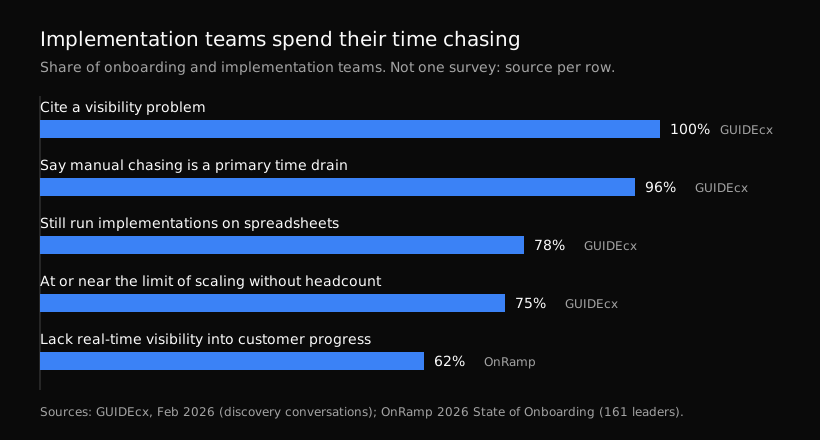
Sources: GUIDEcx (discovery conversations with B2B SaaS onboarding teams, February 2026) and OnRamp's 2026 State of Customer Onboarding (161 leaders).
From hundreds of discovery conversations with onboarding teams, GUIDEcx reports that 96% described manual chasing as a primary time drain, 100% cited some version of a visibility problem, 78% still run implementations on spreadsheets, and 75% feel they are at or near the point where scaling without more headcount breaks down. OnRamp's 2026 survey of 161 onboarding and CS leaders found that 62% lack real-time visibility into customer progress during onboarding, and it names complex setup with scattered tools, unclear next steps and ownership, and manual communication as the top momentum killers. Rocketlane's 2025 report, from a survey of more than 950 leaders and practitioners, found 45% of teams still struggle with information scattered across tools.
Tandem's go-live benchmarks put it plainly: waiting on customers or access, and rework after stalls, dominate timelines more than building does. For low-integration SMB accounts the page says customer responsiveness and activation design matter most.
Read together, these are not configuration problems. They are a job nobody owns between touchpoints: knowing where each customer is, noticing when they stall, and getting them moving again. A project plan cannot do that for every account. A person can, for a few dozen.
What we hear on calls
I did implementation work for years before Aimdoc. Solutions consulting, setting customers up technically after the sale. The calls we have now with software companies sound familiar, with one difference: the teams are smaller than the customer base they serve.
"Live" is a spectrum. A hospitality software team walked us through their onboarding. A new customer creates an account, connects their property management system, and waits for it to sync. Then it depends on which system they connected. Some bring their guest messages over and the customer can start with the basics right away, though most of the product's value still needs configuring. Others only bring reservations, so the customer is not meaningfully live until they connect separate booking channels. Same product, same signup, two very different distances to value. We asked about the gap between the unlock and the go-live, because that gap is where customers drop off.
The bottleneck sits outside the product. In that example, the step that decides go-live is an integration with a third party the vendor does not control. We hear versions of this often: the vendor's own setup is fine, and the customer stalls on a connection to another system, a login only they hold, or data that has to come from somewhere else.
The go-live test is the first real sequence. A reservation software company told us their test for whether the agent was ready: log into a blank trial and watch it take the account through the first critical setup steps. Their trial path has a strict order. Set up the property, create a bookable unit, then make a mock reservation that proves the system works end to end. When that last step is done, the customer is live. Not before.
Teach, do not just configure. Both teams said the same thing in different words. The hospitality team could give an MCP server write access to set every setting for the customer, and chose not to make that the default, because then the customer never learns the product and keeps asking the AI next time. The reservation software team wanted setup that teaches, because customers who have clicked through it once need less support later. I wrote about this choice in agentic UX: the vendor decides, per action, whether the AI does it silently, does it and shows the customer, or walks them through it.
Long implementations are still a person's job, with AI underneath. A head of post-sales at an accounting software company described implementations that mean moving a customer's historical records into the new system. His team uses AI heavily for that, with shared skills and instructions, but anything that needs to be reliable at scale gets turned into code. His harder problem was permissions: an agent set up on his credentials cannot do the same work for a teammate who has different access in the CRM or the support tool.
Implementation as a job the AI owns
Put those together and implementation looks less like a project and more like a job with a state. For each new customer, the job holds one question: has this account reached the setup step that proves the product works for them? It checks that state, acts when it slips, and keeps going until the answer is yes.
Here is how we would set it up.
Define done as a product event, not a date. Pick the first sequence that predicts the customer keeps using the product: the mock reservation, the first shipment label, the first payroll run. That is the job's finish line. Connected, synced and trained are milestones on the way. I covered choosing that milestone in SaaS onboarding best practices.
Map every step, and mark who can do it. Each step between signup and done falls into one of three groups. Steps the AI can do through the product's MCP or API, as the customer, with their permissions. Steps the customer should do with the AI beside them, because they need to know where that setting lives. And steps only a person or a third party can finish: a login to another system, a data export from an old tool, a sign-off. The third group is where implementations stall, so it is the group the job watches most closely.
Chase the blocking step, not the checklist. When a customer stalls on a third-party connection, a reminder that says "you are almost set up" helps nobody. The job should know exactly which step is blocking, why, and what the customer needs to bring: the right login, the right export, the right person on their side. It reaches them where they are, in the app if they are signed in and by email if they are not, and loops in the vendor's team when the call is theirs.
Act as the customer, not as an admin. The job works through the product as that customer, with that customer's permissions. This is also what solves the shared-credentials problem the accounting software leader described. The MCP authorization spec is built around clients acting on behalf of a resource owner, with tokens issued for one server and never passed through to another. I made the longer case in what to expose to your customers' AI agents.
Keep people on the parts that need judgment. Data migrations from old systems, anything with financial or legal weight, and customers with unusual setups still need someone from the vendor's team. The job's role there is to do the waiting and the chasing so that person spends their time on the decisions.
How we run our own
We set up our own new customers this way. When a new customer signs in, our agent opens in the app with the setup objectives for their account and works through them with the person. When they leave halfway, a job keeps the setup moving: it checks where the account is, follows up by email, and tells us when a person should step in. The person never has to come back to a blank checklist.
Each service runs with a tool allowlist, a credit budget and a kill switch, and each account can have its own scope and owner. Updates go out in the app, by email, in Slack or through a webhook, so the job reaches whoever needs to act.
What does not change
Some implementations are projects and should stay that way. A large customer with custom integrations, security reviews and many stakeholders needs a named person and a plan. The guides are right about that. The job model is for the long tail: the hundreds of accounts that each need the same journey, where the vendor today either assigns a person to every account or sends a sequence of emails and hopes.
It also only works as far as the product exposes. If a setup step has no tool behind it, the AI can only show the customer where to click. That is a reason to build the tool, not a reason to skip the job.
FAQ
What is SaaS implementation?
SaaS implementation is getting a new customer from contract to real use of a software product: configuring the account, connecting other systems, migrating data and training the team. For the vendor, it ends when the customer reaches the first result the product exists to deliver.
What is the difference between implementation and onboarding?
Custify separates the two: onboarding is led by a CSM and is about the relationship, implementation is led by a project or account manager and is about technical setup. In practice, for smaller customers they are the same journey, and the useful line is between steps the AI can do, steps the customer should learn, and steps only a person can finish.
Can AI do SaaS implementation?
It can own most of it for smaller customers: the configuration it can do through the product, the guidance the customer needs, and the chasing between steps. Data migration from old systems, sign-off, and complex enterprise rollouts still need a person, with the AI doing the waiting and follow-up around them.
If your implementation team spends its week chasing customers through setup, Aimdoc can own that job for every new account, working through your product as each customer. See services, or start free.