An in-app agent is an AI agent that lives inside a software product, knows who the signed-in user is, and does work in that user's account with that user's permissions. It does not only answer questions about the product. It uses the product's own tools to change things: set up an integration, fix a setting, build the first report, and show the user what it did. If it can only describe the work, it is a help feature. If it can do the work as the user, inside the product, it is an in-app agent.
That is the short definition. The part most definitions leave out comes from the calls we have with software companies building these. Most of their customers will never connect the product to an outside AI assistant. They will not paste an MCP server URL into Claude or ChatGPT, and they will not configure a connector. So for most customers, an in-app agent is the only way they will ever get an agent that can operate the product. It brings the capability of the product's MCP server to the people who will never go looking for it.
The second thing we have learned is that an in-app agent stops being useful the moment it only works while the user is looking at it. The agent is how a customer reaches the work. The work itself has to keep going after they close the tab.
The definition, in parts
Each part of the definition rules something out.
- Inside the product. It runs in the product's own interface, usually a side panel, on the screen where the user already is. That rules out an assistant the user runs somewhere else.
- Knows who the user is. The product tells the agent who is signed in, which account, which plan, and what they have set up so far. Nobody re-introduces themselves.
- Acts with the user's permissions. Every action runs as that user, in their account, and can do only what they could do. It is never an admin key with a friendly face.
- Does work, not only answers. It calls the product's tools to change state, and it can walk the user to the right screen when the user should do a step themselves.
The broader idea of an agent is well defined. Anthropic describes agents as systems where LLMs dynamically direct their own processes and tool usage, checking the results of each step against the environment. An in-app agent is that pattern, placed inside one product, scoped to one user.
What an in-app agent is not
Three things get called in-app agents. Each is useful. None of them is the same thing.
A help widget
The help icon in the corner is a way to ask. Zendesk's description of in-app support is a fair summary of the category: customers click an icon in-app to access your FAQs, submit feedback, or open a ticket. An AI can sit behind that icon and answer well from your docs. It still answers. The customer reads the answer and goes and does the work. We wrote more about that category, and what it got right, in in-app support.
A copilot sidebar
Many software products now ship a copilot. Databricks defines an AI copilot as an AI assistant embedded directly in a software application that offers suggestions or actions "that the user can accept, modify, or reject," and sums up the split as "copilots augment, agents act." CopilotKit makes a structural version of the same point: a copilot is an agent embedded in an application, working alongside a user inside the user's own context, and the two "differ in where they live and how they relate to the user, not in the underlying technology."
We agree with that framing, and it is why the sidebar alone does not settle the question. The panel is the interface. What makes something an in-app agent is what sits behind the panel: the user's verified identity, memory of the account, access to the product's tools, and the ability to keep working when the user is not in the conversation. A sidebar that drafts text for the user to paste is a copilot. A sidebar that connects the integration is an agent.
An outside assistant using your MCP server
This is the comparison product teams ask us about most. If the product has an MCP server, a customer can connect it to their own assistant and operate the product from outside it. The protocol supports this properly: MCP's authorization spec lets clients make requests to restricted MCP servers on behalf of resource owners, with OAuth tokens bound to that server.
It works, and some customers will want it. But look at what the customer has to do. In Claude, adding a remote MCP server means going to Customize, then Connectors, choosing to add a custom connector, entering the server URL, and choosing an authentication option. On Team plans, only Owners and Primary Owners can add them. That is a fine path for an operations lead who lives in Claude. It is not a path most of a software company's customers will take.
The other difference is who is responsible. An outside assistant decides on its own how to use your tools, with no knowledge of your product beyond the tool descriptions. An in-app agent is configured by the company that makes the product: which tools it may use, which steps need the user's confirmation, and when a person on the vendor's team should step in. The vendor keeps control of how its product is operated. We think that makes the in-app agent the safer default for most customers, and the outside assistant a good second door for the few who want it.
What we have seen building one
Everything above comes from published definitions. This part comes from building an in-app agent at Aimdoc and from the calls we have had with software companies this year.
Most customers will not bring their own AI. On a call in October, a team running hospitality software told us their customers were not the kind to ask for an MCP connection. They still wanted AI inside the product, because they could see new users getting lost in settings and automations they never found. An IT asset management company told us its first MCP server would ship read-only, for the customers who want to pull data into Claude or ChatGPT. Both are sensible choices. Neither reaches the customer who just signed up and does not know where to start. A prospect described what we showed them as bringing Claude into the tool for customers who are not going to use it anywhere else. That is close to the definition we use.
Doing and showing are both work. The same hospitality team was clear that they did not want an AI silently changing everything. Their customers have to learn the product to get value from it. So the line between "do this for me" and "show me where this lives" has to be something the vendor sets, task by task. In our agent it is: the vendor decides which steps it does through the product's tools and which it walks the user through on screen. Where a product has no tool for a step, the task is recorded once and the agent runs it in the browser. For integrations that live in someone else's product, it takes the user to the exact screen where they generate the key, and picks up when they come back.
The conversation is not where the work ends. A new user signs up, gets halfway through setup, and leaves. A help widget is done at that point. The agent we built continues over email, still signed in as that user, so a reply can finish a step. And longer work is handed to a service: a job the AI owns for that customer, like getting their account live, that checks where they are and acts when progress stalls. The in-app agent is the front door to that job, not the job itself.
People use it unprompted, and it shows up in retention. Starshipit, a shipping software company, put our agent inside its new app. In the first five weeks of the pilot, 23% of new users engaged the agent with no proactive nudges, the median first conversation came 15 minutes after signup, and 41% of conversations were multi-turn working sessions on things like printer setup and carrier integrations. Users who engaged in their first month were active the next month at 67%, against 26% for users who did not. Engaged users are a motivated group, so that is not proof of cause. It is evidence that new users bring real work to an agent in the product when it is there.
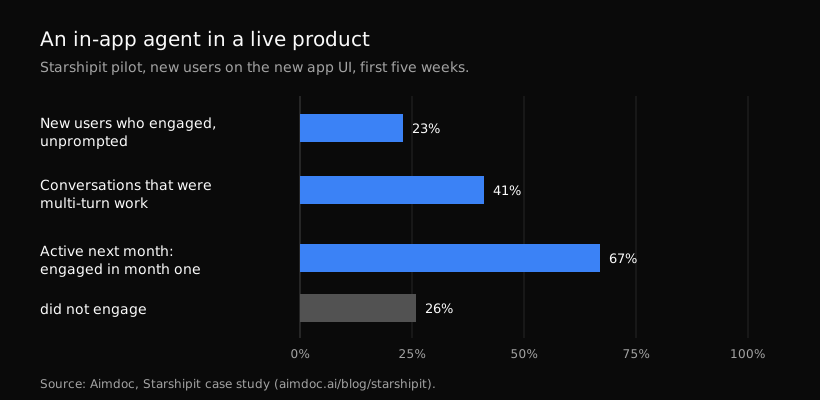
Starshipit's first five weeks with an in-app agent, from the published case study.
How to tell if you have an in-app agent
Four questions settle it.
- Does it know who is signed in without asking? If the user has to type their email or account name, it is not tied to the product's identity.
- Can it change something in the user's account? If every answer ends with "go to Settings and click," it is a help feature.
- Is it limited to what that user is allowed to do? If it acts with a shared service key, it is a risk, not an agent.
- Does the work continue when the user leaves? If closing the panel ends everything, it is a conversation, not a way to get work done.
A product that answers yes to all four has an in-app agent. A product that answers yes only to the first has a well-placed help feature.
When you do not need one
Not every product does. If your customers use the product the same simple way every day and rarely get stuck, an agent adds little. If your product has no API and no MCP server, start there: an in-app agent can only do the work your product exposes to it. And if your customers are mostly technical users who already run their own assistants, a good MCP server may serve them better than anything in the app.
The case for an in-app agent is strongest where customers need ongoing work done on top of the product, such as setup, integrations, compliance, or data hygiene, and where today they either do it by hand or ask your team. In our experience, that describes a lot of B2B software.
FAQ
Is an in-app agent the same as an AI copilot?
No. A copilot is defined by where it lives: inside the app, next to the user. An in-app agent also lives there, but it is defined by what it can do: act in the user's account with their permissions, and keep working after the conversation ends. Many copilots only suggest.
Does an in-app agent need an MCP server?
It needs some way to use the product, and an MCP server or an API is the cleanest. Where a product has no tool for a step, an agent can fall back to doing that step in the browser, but the more the product exposes as tools, the more reliable the agent is.
Who is responsible when an in-app agent gets something wrong?
The software company that deploys it, which is why it should control which actions the agent may take, which ones need confirmation, and when a person takes over. That is a real difference from an outside assistant, where the customer's tool decides how to use your product.
Aimdoc puts an agent inside your product that works as each signed-in user, and hands longer work to services the AI owns for each customer. See the in-app agent, or start free.