To build an MCP server, you pick an official SDK, declare a few tools with typed inputs, choose a transport, and test it in a client like Claude. That part is well documented and genuinely quick. For a SaaS product, though, the server is the easy part. The decisions that take the time come before the first tool is written: what layer the server sits on, whether the feature it exposes exists yet, and which job the first tools are for.
That is what we have seen on the MCP builds we have done or helped plan with software companies this year. The tutorials assume you already have a clean public API to wrap. Most of the companies we work with did not. They had an internal API full of logic they did not want an agent to touch, features that only existed as screens, and no settled view on which customer job the server was for.
So this post skips the hello-world. It covers what the ranking guides already agree on in one section, then spends the rest on four decisions we watched teams make, in the order they come up.
What the build-an-MCP-server guides already agree on
The mechanics are solved. The official MCP tutorial builds a weather server with two tools, get_alerts and get_forecast, and walks through it in eight languages: Python, TypeScript, Java, Kotlin, C#, Ruby, Rust and Go. If your team can ship an endpoint, it can ship a server.
The design advice has converged too. Anthropic's guide to writing tools for agents warns that "more tools don't always lead to better outcomes" and names a common error: "tools that merely wrap existing software functionality or API endpoints." Instead of separate list and create tools, it suggests one schedule_event tool that finds availability and books the event.
Philipp Schmid calls 1:1 conversion of REST endpoints a trap, and recommends designing tools "around what the user/agent wants to achieve," with 5 to 15 tools per server and "one server, one job." Nordic APIs makes the same case: MCP "isn't supposed to be a one-to-one mirror of your API," it is "an interface for intent." And WorkOS's guide to designing an MCP server from a REST API starts from five to ten things a user would ask for, cites Workato's guidance of roughly five to eight tools per server with twelve as a soft ceiling, and hides destructive and admin endpoints by default.
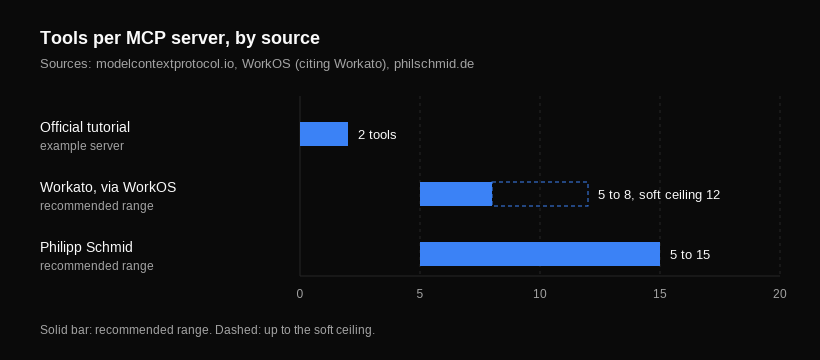
Tool-count guidance from the sources linked above. Every source points the same way: a small server built around what someone is trying to get done.
All of that is right, and we follow it. But every one of these guides starts with an API that already exists and asks how to shape tools on top of it. For a software company adding MCP to its own product, that starting point is usually the problem.
What we saw on the builds
These are patterns from MCP builds with software companies, anonymized and in my words, plus how we built our own.
1. Build the feature in the product first
On an early call with a learning platform company, its founder asked whether a new feature, letting admins customize their learner portal with AI, should be built as part of the MCP work. My answer was no. Build the feature in the product, so an admin can do it by hand, and design it so the functionality is centralized and easy for anything to call. Then put MCP on top of what exists.
The reason is practical. Once the feature works in the app, you can see exactly which backend endpoints change what, and exposing those to the server, with validation, is the small step. If the only way to do something is a sequence of screens, an MCP tool has nothing clean to call. The agent will either fail or fall back to driving the UI.
We saw the fallback happen. When I was testing an agent building a course through that company's new MCP tools, a few ordinary bugs in the tools stopped it, and it fell back to the browser and built a full lesson through the UI instead. That is a useful safety net. It is also a sign of where the product's real interface still lived.
2. Do not expose your internal API. Build a capability layer
The same founder raised the next question himself: should the agent use the internal API the app already runs on? He did not want to, because that API carries logic he would never expose to customers. I agreed. The plan became a separate, restricted external surface, which both MCP and any customer-facing REST API would sit on.
This is how we built ours too. Underneath, there is one shared layer of capabilities that are meant to be external. For each capability you decide whether it goes in the REST API, becomes an MCP tool, or both. They end up shaped differently, because a REST API is discrete endpoints for developers and an MCP tool is a unit an agent can use to get something done. When we built that company's first MCP framework, the MCP project and the REST API project ended up separate, both on the same capabilities, with the internal admin and auth APIs left untouched.
This is the decision the "do not wrap your API 1:1" advice skips. It assumes a public API to start from. For many products, the first real piece of work is deciding what is external at all.
3. Let the first job choose the first tools
Every team we have worked with has more endpoints than they want in a first version, and the cut is never made by reviewing endpoints. It is made by picking a job.
On a later call with the same company, the question was whether to start with a server for its support app or to do the course-building tools in the main product at the same time. The job they wanted first was investigating and answering tickets, so the plan became two servers: one on the support app, covering what that job needs, like reading a ticket's context, creating a ticket and replying to one, and one on the customer-facing app for course creation. Reporting was moved to a later phase.
That matches the "one server, one job" advice, but the order matters. Start from the endpoint list and you get a server shaped like your codebase. Start from the job and you get a server shaped like the work. When we built their first MCP framework a few months earlier, the founder set the bar himself: a structure his team could keep adding to, not every endpoint on day one. I think that is the right bar.
4. Give the agent the server, not the database
When that team discussed how an agent would investigate support issues, the question of read-only database access came up. Their engineer ruled it out: the agent gets the MCP tools to query, not the database, because direct access brings a different set of problems. The plan for their support agent is read only: no updates, creations or deletions while it investigates.
What makes this work is that every call through the server runs as a real customer. The agent working in the app uses the server as the signed-in user, and the jobs running in the background are authenticated for the customer they run for, so they can only reach that customer's data. The server is the boundary. We wrote about how each caller resolves to one user in MCP authentication for SaaS, and about which reads and writes to offer in what to expose to your customers' AI agents.
Test it by doing the job
The tutorials test a server with an inspector, one tool call at a time. That catches schema errors. It does not tell you whether an agent can get real work done.
Anthropic's guide makes the same point about evaluation: prompts "should be inspired by real-world uses and be based on realistic data sources and services," and it warns against "overly simplistic or superficial 'sandbox' environments." On the builds above, the useful tests were jobs: an agent building a course end to end, an agent investigating a ticket. That is where the bugs showed up, including the one that sent our agent to the browser.
Test every way in, too. The learning platform's server has three: OAuth for customers connecting their own assistant, API keys for scripts, and a signed identity so an agent in the app can act as whoever is signed in. Our plan before sign-off was to test each one, because a server that works for one caller can still fail for the others.
Why the server is not the end of the build
Once the server is live, the pressure is to keep adding tools. On one of these calls I argued the other way. If every capability becomes a tool that a customer's assistant has to choose from, it gets worse as the list grows. We wrote up what happened to our own agent at 63 tools in too many MCP tools.
What a customer's assistant should increasingly see is the work: a job the vendor runs end to end on its side, for that customer, with the vendor's own tools. The server is how that job reaches the product. The job is what the customer wanted in the first place. That is why we treat the MCP server as the start of the build, not the finish, and why services are where most of our attention goes once a server exists.
The short version
- The server is quick. An SDK, a few tools, a transport, an inspector. The guides cover it well.
- Build the feature first. If a customer cannot do it in your product, a tool cannot do it either.
- Do not expose the internal API. Put a restricted capability layer underneath both MCP and REST, and shape each for its caller.
- Pick the job, then the tools. One server per job, starting with the job that matters most now.
- Give the agent the server, not the database, and make every call run as one real customer.
- Test with the job, through every way in.
Aimdoc connects to your MCP server as each of your customers and runs the jobs they need done, from support to onboarding, through your product and your systems. See how services work, start free, or book a demo.