Product adoption is the point where a customer stops trying your product and starts relying on it: the features they pay for are doing real work in their account, week after week. The guides that rank for it describe an adoption curve and a toolkit to push customers along it: tours, tooltips, checklists, in-app messages, emails to inactive users. Our view, from our own customers and the software teams we work with, is that an account does not adopt a feature because it was shown the feature. It adopts the feature the first time real work gets done with it, in that account, with that customer's data.
That changes who has to do something. A tour asks the customer to do the work after being shown how. The alternative is for the vendor's AI to do the first real piece of work with the feature, in the customer's account and with their permissions, and then show them where it lives.
So this post argues one thing the adoption guides do not: product adoption should be a job the AI owns for each account, not a campaign aimed at all users. The job knows which features the account already uses, finds the next one its own data says it is ready for, does the first piece of work with it, and keeps going.
What the product adoption guides recommend
The ranking guides agree on the shape. Custify's product adoption guide defines adoption as customers integrating a product into their routine, separates user adoption from account-level customer adoption, and walks six stages from awareness to adoption. Its tactics are onboarding checklists, in-app guides, a knowledge base, video libraries, webinars and live chat, measured by adoption rate, time to first key action, usage frequency and stickiness. Userpilot's SaaS adoption guide lists contextual tooltips, personalized onboarding flows, walkthroughs, checklists, resource centers and behavior-triggered emails. To its credit, the 2026 update also says the user may now be an AI agent, that tooltips are invisible to agents, and that activation for an agent should mean its first successful output.
Those are sensible tools, and both guides are right that adoption is about value, not logins. But almost every tactic on the list has the same structure: show the customer something, then wait for them to do it.
How much of a product actually gets adopted
The size of the gap is well measured. Pendo's 2019 Feature Adoption Report, built from three months of anonymized usage across 615 of its customers' products, found that 80% of features in the average product are rarely or never used, and that 12% of features generate 80% of daily usage volume. Its 2024 product benchmarks, drawn from 6,800 customers, put it more starkly: for every 100 features built and launched, 6.4 drive 80% of click volume.
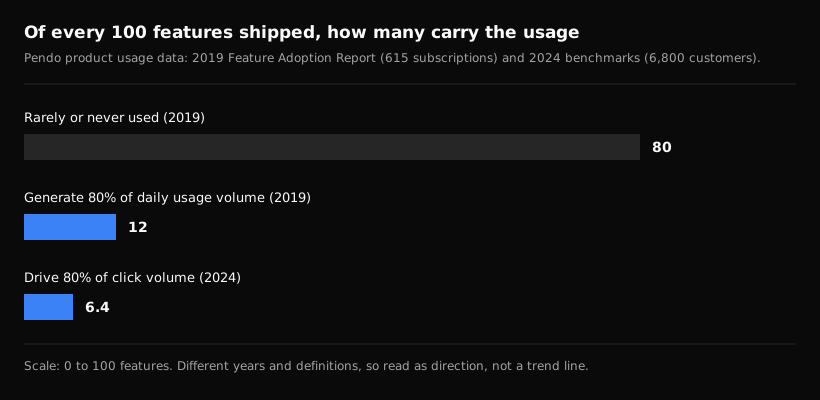
Pendo's figures from its own customer base, linked above. The two years use different definitions, so read the bars as direction.
Part of that is discovery. Nielsen Norman Group's study of AI feature discoverability (Kate Moran and Feifei Liu, 2025) found that most AI features it tested could neither be noticed nor found. Participants did not expect the features, did not notice them, and often could not find them when told to look. Once shown, they often found the features useful, and several said they would never have used them unprompted. As the authors put it, even features that offer value won't be used if people don't notice them.
The standard answer to that finding is more showing: a better tooltip, a clearer label, another announcement. We think the finding points somewhere else.
What we saw: adoption follows the first piece of real work
Here is what came from our own calls and our own product.
Our own customer did not find a view we had built for them. In September, a sales lead at one of our customers, a campground reservation software company, told us he did not know where to see what users had done inside his product. The view existed and had shipped. I walked him to it on a call, filtered to his own sessions. Nothing about the feature changed. What changed was that someone showed him the answer in his own data, at the moment he wanted it. On the same call we showed him what we built for this problem, and it is not a tour: when a user comes back, the agent looks at everything they have done and messages them about the next step that fits, and if they leave before it can, it sends the same thing by email. It has surfaced things our customers' users were looking at that I did not know about.
The vendor already knew which action meant adoption. The same reservation software company told us in July that a trial with no bookable units added rarely turns into a real evaluation, and that a trial with units is a strong signal of intent. Their adoption metric was not a click on a feature. It was one piece of real work done in the account. Most vendors can name that action for each feature if you ask. Very few have anyone, or anything, whose job is to get it done for each account.
Features with no one to start them stay off. That company's most common add-on is text messaging, which a customer turns on themselves in their property settings. When I asked what else customers pay for, their sales lead suggested it himself: an agent that sees a live account and makes the case for texting at the right moment would be a solid upsell. And their customers' most frequent request was not a feature at all. It was reporting, because today each report is pulled by hand. That is a request for work, not for another screen.
Settings nobody can explain do not get adopted. An IT asset management company we spoke to in October has hundreds of settings, most of them tribal knowledge, with some FAQs and no per-setting documentation. A tooltip cannot carry tribal knowledge. Someone who knows the account and the product has to make the call about which setting matters for this customer, and then make the change.
The best adoption research question is about work. A learning platform company we work with planned to survey its customers before building its AI tools. The question was not which feature they wanted to learn. It was: what is one thing you would like to automate? That is the question an adoption job should keep asking of each account's data.
The pattern across these is simple. Adoption showed up where work got done in the account. It stalled where the customer was expected to go and find the feature, learn it, and do the first piece of work themselves.
Product adoption as a job the AI owns
A service, the way we use the word, is a job the AI owns for each customer and keeps working, like getting a new customer live or keeping an account healthy. It holds a state it can measure and acts when that state slips. It is not a scheduled report or a one-off task. Product adoption fits that shape well, because the vendor can usually name the state: which features carry real work in this account, and which ones this account is ready for but has not started.
Here is what the job does, account by account:
- Know what the account already relies on. Through the vendor's product (MCP or API) and the vendor's systems (CRM, support history), the job sees which features hold real data in this account, not just which ones were clicked.
- Pick the next feature from the account's own data. A reservation business taking a lot of phone bookings is ready for guest messaging. A training company with a new location is ready for a second catalog. The signal is work the account is already doing by hand.
- Do the first real piece of work with it. Signed in as the customer, with their permissions, the AI sets the feature up with the account's own data: the first message template, the first report, the first rule. The customer approves where they should.
- Show where it lives. Then it brings the customer to the screen and walks them through what it did, so the next change is theirs to make. We wrote about why that kind of teaching sticks in customer education for SaaS.
- Watch whether it holds. If the feature goes quiet, the job notices and asks why, instead of waiting for it to show up as a lower number in a customer health score.
- Loop in a person when it should. A paid add-on, a change to billing, a deployment that needs a call: the job hands those to the account owner with the context of what it saw.
This is the stage after setup. Getting a new account live is its own job, which we covered in SaaS implementation as a job. Adoption picks up where that one ends: the account is live, and the question becomes what it should rely on next.
What changes for the team that owns adoption
If adoption is a job, a few things move.
The metric moves from clicks to work. Adoption rate and time to first key action are still useful, but the measure that matters is whether each feature carries real work in each account that should be using it. The vendor already knows what that work looks like. The reservation team knew a bookable unit was the signal.
Announcements stop being the main lever. A release email reaches everyone and helps the few who were already looking. A job that sets the feature up for the accounts that are ready reaches fewer people and changes more of them.
Expansion becomes a by-product. When the next feature is a paid add-on, the job that did the first piece of work with it has also built the case for it in that account. What the vendor charges for that work is the vendor's own price, and we wrote about how vendors sell jobs like this in services.
The CS team steers instead of chasing. People stop sending the same adoption nudge to a hundred accounts and start deciding what the job should do in the accounts where judgment matters.
FAQ
What is product adoption?
Product adoption is the point where a customer relies on a product as part of how they work, and the features they pay for carry real work in their account. Most guides measure it with an adoption rate (new active users over new signups), time to first key action, usage frequency and stickiness.
What is the difference between product adoption and feature adoption?
Product adoption is about the account relying on the product at all. Feature adoption is about which specific features carry that use. Pendo's data suggests most products have far more features than any account adopts, which is why feature adoption is where most of the remaining value sits.
How do you increase product adoption?
The standard advice is onboarding checklists, tours, in-app messages and education. Our advice is to start from work: name the action that means a feature is adopted, find the accounts whose own data says they are ready, and have the AI do that first piece of work with each of them, then show the customer where it lives.
Aimdoc runs jobs like this for each of your customers, through your product and your systems, with your team steering. Start free on your own product, or book a demo.